Showing posts with label risk. Show all posts

Reporting in Financial Reporting Compliance

In Financial Reporting Compliance provides a set of predefined reports organized into five categories.

Assessment Reports
  • Assessment Details Reports - displays information about assessment conducted against selected objects.
  • Control Assessment Report - lists controls and their related assessment activities in PDF format
  • Control Assessment Extract - lists controls and their related assessment activities in Excel Format
Control Reports
  • Control Details Report
Issue Reports
  • Issue Details Report - provides information about selected issues, including the object against which each issue is raised, issue status and state, users who created or updated and when they did so, and other values.
  • Issue Details Extract - provides similar information for export to an application such as Excel.
Risk Report
  • Risk Control Matrix Report - lists risks, controls and related information: perspectives and other values
  • Risk Control Matrix Extract - lists risks, controls and related information for export to Excel Format
Administration Reports
  • Change history Report
  • Pending Worklist Items Report
  • Related Objects report
  • Worklist Item Requiring Reassignment
Activating Email Alerts

Setup e-mail messaging in Financial Reporting Compliance users when tasks require their attention.
  1. select the Enable check box in the E-Mail Alerts region
  2. Select the test connection button to view a message that connectivity with your email server is established.
  3. Create an email alert schedule

Overview of Surveys in Risk Management Cloud

What is a Survey in Risk Management Cloud?

A Survey is a set of questions that may be associated with assessments or distributed independently of assessments.

You may link a survey to an assessment activity in an assessment plan. Survey questions concern the type of object (process, risk or control) and the activity specified in the plan. Answers to the questions help assessment participants form judgments about objects in assessments developed from the plan. Assessment participants are selected automatically on the basis of their job roles.

As you prepare a survey, you may start with any of the following components:
  1. Choice Sets. A choice is a possible answer to a question, and a choice set is an assortment of answers a person may select from. You can associate a given choice set with any number of questions.
  2. Questions. These may or may not require choice sets. Or you can select choices are you create questions and save them into choice sets.
  3. Template. As you create a template, you can select existing questions for it, or create questions. Moreover, you can use an existing template to distribute a new survey or create a new template for a survey.
Survey question formats

Survey questions may take the following formats. For any format other than open text, you can associate a question with a choice set.


Control Management in Risk Management Cloud

What is a Control?
A control defines measures to address risks. It describes actions taken automatically in other systems or manually. For example:
  • Ensure segregation of duties within payroll functions
  • Review changes to master data, including change owner.
Relating Controls to a Risk

As you create risks, you can relate them to controls.
  • The relationship indicates that a control mitigates the risk it is related to
  • you can relate any number of controls to a risk, or a control to any number of risks.
A control requires only two values:

  1. A Name, which should suggest what the control does to mitigate risk. You may choose to add a description that expands upon the name.
  2. A Method. Either Manual or Automatic:
As you create a control, you can create a test plan for it. Completed as part of a control assessment, it test whether the control is effective in alleviating the related risks.

Issue Management and Lifecycle in Risk Management Cloud

Manage the Issue Resolution Process

The resolution of an issue includes these steps:
  1. A User creates an Issue
  2. A User with proper privileges validates the issue, either determining that it requires investigation, closing it or putting it on hold
  3. If the issue is valid, a user with proper permissions determines whether a remediation plan is required for the issue to be resolved. If not, this user closes the issue.
  4. If so the user creates or selects a remediation plan. Other users respond to the worklists to complete remediation tasks. The remediation plan is marked as complete and the issue is closed.
The Issue object records defects or deficiencies detected for risks, controls or assessments. Typically, you discover issues when you assess risks or controls. Typically, one user identifies an issue, another verifies it and another resolves it.

Raising an Issue

A user may raise an issue from several places:
  • From an issue-management work area
  • from the issues tab in the management page for an individual risk or control, create an issue specific to that object or review its details
  • within an assessment of a risk or control
Resolving an Issue

Once an issue exists, the process of resolving it may include:

  1. Validating the issue
  2. Take appropriate actions to resolve the issue
  3. Closing an Issue
Validating the issue

When an issue is created, a user may receive a worklist notification to validate if. This user may:
  • Determine that it requires investigation.
  • Determine that it does not require investigation, and close it
  • Put it on Hold
To Receive a validation worklist, a user must be assigned a duty role called Issue Validator Composite. In effect, this user determines whether the issue is genuine, and so should be a user other than the one who creates the issue. However, the validation workflow is optional. If no user is assigned the Issue Validator Composite duty role, no validation worklist is issued.

Users with the Issue Validator Composite, or Issue Manager Composite duty role may oversee the validation and resolution of issues, and close them.

Closing an Issue

you can close an issue:
  1. when it is resolved; when points of concern have been addressed
  2. At any other time. You may, for example, determine during the validation step that the issue is invalid or cannot be resolved.
For more full-detailed Tutorials and Tips, check out #TheOracleProdigy at https://lifeofanoracleprodigy.blogspot.com/
Follow The Oracle Prodigy on Facebook (https://www.facebook.com/theOracleProdigy/) and Twitter (https://twitter.com/D_OracleProdigy)

Overview of Assessments in Oracle Risk Management Cloud

What is an assessment?

An assessment is the review of a risk or a control to ensure that it is defined correctly or that its definition remains appropriate over time.

An assessment may
  • focus on objects themselves, or on activities involving object, such as certification or audit
  • be batch or ad-hoc
  • concern a single risk or control, or encompass many.
  • Involve the participation of business stakeholders, internal and external auditors, or other users.
  • Incorporate test plans for controls
To determine what an assessment is meant to uncover, you assign one or more activity types to it. assessment activity types include:


The Assessment Page
  • An Introduction page presents an overview of the item being assessed. It includes guidance text, which is a broad statement of the assessment's purpose.
  • A "Review Prior Results" page displays records for any prior actions taken for this assessment.
  • An "Enter Test Results" page enables you to complete a test plan. It appears only if you are assessing a control for which a test plan has been created.
  • Use the response field to select an answer to an activity question. This determines whether the object passes or fails the assessment. You can also create a summary statement, create an issue, or attach a file to the assessment.
Batch Assessments follows the flow:


A batch assessment depends on several components
  1. A template designates a primary object of assessment, Risk and Control. The template also designates one or more activities to be completed in assessments.
  2. From the template, you develop a plan. It may contain filters that select instances of the primary object specified by the template. 
  3. From a plan, you initiate an assessment, selecting object instances made available by the plan.
A batch assessment offers an array of options:
  1. It not only involves multiple object instances, but also may designate multiple activities to be completed
  2. Its generation involves the use of supporting tools: templates and plans. You use these to select assessment activities to define a set of objects for assessments.
  3. You Initiate it and manage the components that support it within the Assessment work area
Initiating a Batch Assessment
  1. Provide the general information
  2. Review the selection criteria
  3. select risks or controls to be assessed
  4. review participants
The final page in the initiate assessment series identifies the assessors for each risk or control selected for assessment. These people are selected according to role assignments, and you cannot modify that selection in this page.

The purpose of this review is to identify risks or controls that have no assessors, so that you can return to the components page and remove them from the assessment

Adhoc Assessments

An adhoc assessment is simpler:
  1. It not only focuses on a single object, but also designates a single activity to be completed
  2. You initiate it from within the page to manage the risk or control you want to assess
Completing an Assessment

An assessment may include any number of risk or controls. You assess each of these individually. You May:
  • Select a Worklist notification for a risk or control included in the assessment
  • Select the "Complete Assessment" option in the tasks panel tab of any page in the Assessments work area. In a search page, search of an Assessment, select one of its risks or controls, and select "Complete Assessment".
  • Navigate to the Assessments tab of the Management page for the risk or control being assessed. Select the row for an Assessment and the "Complete Assessment" action.
For more full-detailed Tutorials and Tips, check out #TheOracleProdigy at https://lifeofanoracleprodigy.blogspot.com/
Follow The Oracle Prodigy on Facebook (https://www.facebook.com/theOracleProdigy/) and Twitter (https://twitter.com/D_OracleProdigy)

Overview of Perspectives in Risk Management

What is a Perspective?

Perspective is a set of related, hierarchically organized values. You can
  1. Create other perspective hierarchies
  2. Assign perspective values to processes, risks, models, controls, and incidents
  3. Assign perspective values to data security policies
  4. Use perspectives as a filter for searching and reporting
Perspectives are used for filtering/security and control rights. These are hierarchy of values that can either be based on your Organizational structure , Regulatory compliance, Geographic Location or Processes.

Before a perspective hierarchy is available for use, you must associate it to Module Objects. These Modules are
Below is a quick demonstration of Assigning perspectives to Module Objects:


You cannot add more modules, but you can modify them according to your business needs

After assigning a perspective to a module object, you would need to run a couple of jobs. Jobs are individual requests to synchronize data, evaluate models or advanced controls, export results, generate reports, or perform other background tasks. You run a job on the page to which the job applies, but you manage it in the Monitor Jobs page. You can:
  • See the current status of the job
  • Manage files created by the import or export jobs
  • Cancel some jobs
  • Purge the Job History

A perspective filter may use an "Includes Children" condition. If so, it grants access to objects tagged with a perspective value you select for the filter, or with any of its child values.

A single perspective filter  may select more than one perspective value. If so, those values have an OR relationship. The filter grants access to objects associated with any of the values.

A data security policy may include multiple perspective filters. If so, they have an AND relationship. The policy grants access only to objects associated with values selected by all the filters.

For more full-detailed Tutorials and Tips, check out #TheOracleProdigy at https://lifeofanoracleprodigy.blogspot.com/
Follow The Oracle Prodigy on Facebook (https://www.facebook.com/theOracleProdigy/) and Twitter (https://twitter.com/D_OracleProdigy)

Financial Reporting Compliance in Risk Management Cloud

What is Financial Reporting Compliance?

Financial Reporting Compliance is, in effect, a module of Risk Management. Its objects include Risk, Control (along with a test plan, test instruction and test step), and Process (along with action item).

Financial Reporting Compliance consolidates the documentation of your business practices to satisfy financial reporting regulations. This Enterprise-scope solution enables you to:
  1. Define and interrelate processes, risk, controls, assessments and issues.
  2. Automate periodic reviews, approvals, test and follow through.
  3. Secure what users see and do.
  4. Let stakeholders get the information they need to make the best decisions.
  5. Lower cost by implementing efficient, repeatable, and reliable day-to-day usage and administration.
The Financial Reporting Compliance module includes three object types: Process, Risk and Control
  1. Process is the parent of Risk. As you create or edit a process, you can relate it to risks that may affect it, or create related risks.
  2. Risk is the parent of Control, as you create or edit a risk, you can relate it to controls meant to address it. 
  3. Controls may work together to address a given risk, and if so, other configurations values may apply to them.
Risk-Control Matrix

Financial Reporting Compliance maintains a risk-control matrix:


Every business process is subject to risks, and a company enacts controls to minimize those risks.
A risk-control matrix is an organized record of all the material risks that may affect each process and all the controls created to address those risks.

Predefined Job Roles for Financial Reporting Compliance:
  1. Enterprise Risk and Control Manager 
  2. Compliance Manager 
Both of these are Superuser roles providing functional and setup access to anything a person can do in Financial Reporting Compliance.

Best Practice Financial Reporting Compliance


The Best Practice Solution is a prescriptive set of steps for deploying key elements of Financial Reporting Compliance with maximum Speed and efficiency, and with minimum cost and upkeep.

Best Practice Solution Steps

  1. Gather Configuration Data
    • Retrieve existing risk and control definitions from spreadsheets, email-records, file-sharing system, and any other Repositories.
    • Collect related data, such as documentation needed to support risks and controls.
    • Consider who is to work with risks and controls and the roles they are to fill.

  1. Prepare and Import Data
    • Use the data migration utility to import this data into Financial Reporting Compliance
  1. Configure Roles and Users
    • Use Oracle Identity Manager and Authorization Policy Manager to define risk management roles and assign them to users. You can create job roles from predefined duty roles.
Use risk-management and control-management work ares to create new risks and controls, or modify existing ones.
Optionally, use Risk Management workflow to route risks and controls to reviewers and approvers
Regularly assess risk and controls to ensure their continued viability.

For more full-detailed Tutorials and Tips, check out #TheOracleProdigy at https://lifeofanoracleprodigy.blogspot.com/
Follow The Oracle Prodigy on Facebook (https://www.facebook.com/theOracleProdigy/) and Twitter (https://twitter.com/D_OracleProdigy)

Security Strategies for Risk Management Cloud (draft)

Cloud Security Methodology can be summarized with a simple statement: "WHO can do WHAT on WHICH set of data?" where:
  1. WHO is the User
  2. WHAT actions the user can perform, reflected in job and duty roles
  3. WHICH set of data is reflected in data security policies
An example is below:

Security Processes


For more full-detailed Tutorials and Tips, check out #TheOracleProdigy at https://lifeofanoracleprodigy.blogspot.com/
Follow The Oracle Prodigy on Facebook (https://www.facebook.com/theOracleProdigy/) and Twitter (https://twitter.com/D_OracleProdigy)

Overview of Advanced Controls Management in Risk Management Cloud

What is Advanced Controls Management?

Advanced Controls Management is concerned with the testing of Financial Transactions and the segregation of duties. ACM is further broken down into two:

  1. Advanced Access Controls
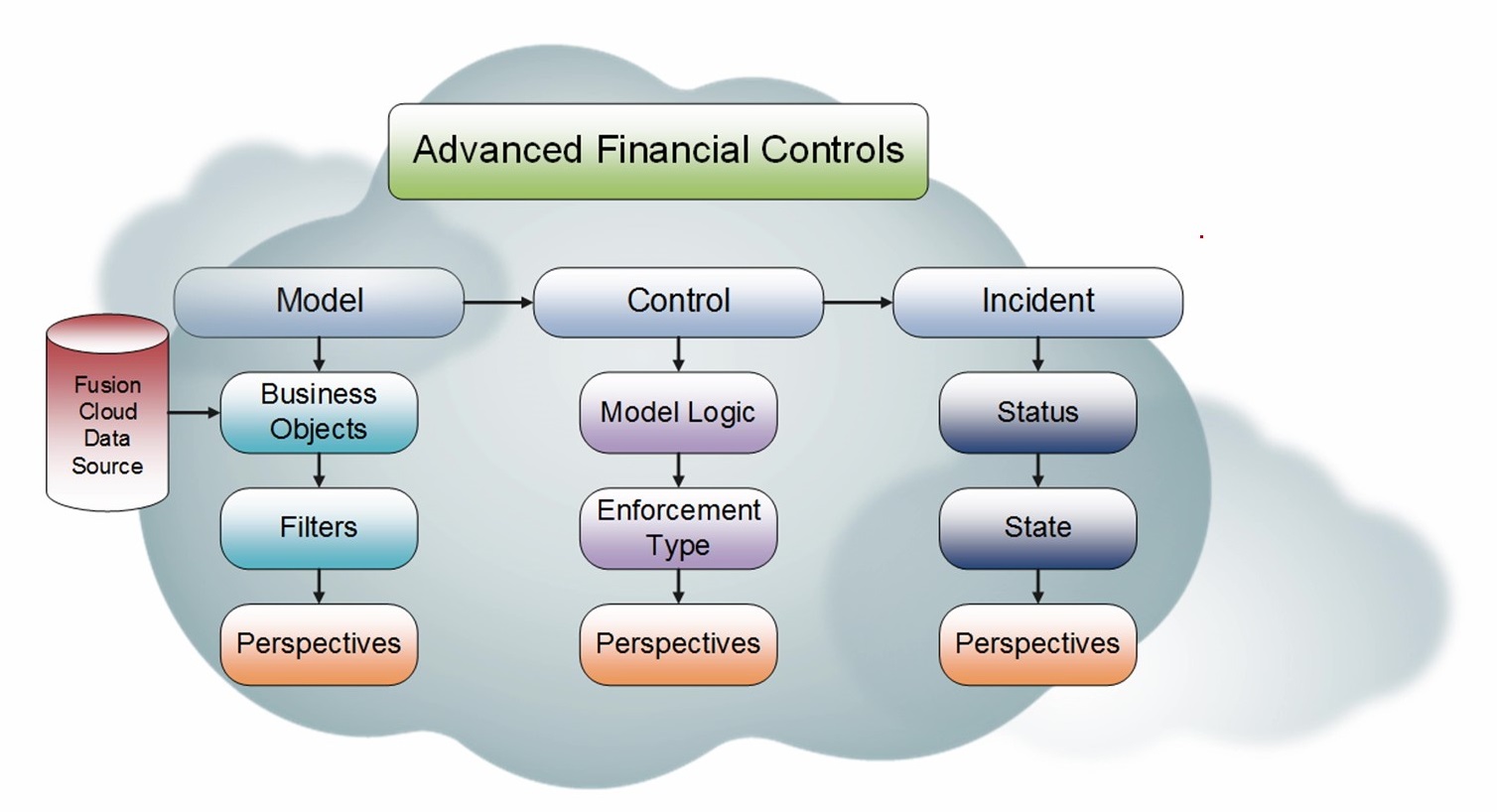
  2. Advanced Financial Controls

Advanced Access Controls


Why is there a need for Advanced Access Controls?
  1. Stop Payment Fraud and Error
  2. Prevent Insider Data Breaches
  3. Remove Blind Spots and stay ahead of Emerging Risks
Advanced Access Control is used to monitor users who have access to do the following:


One example of the use and importance of Advanced Access control is the Analysis of Access Privileges.

Advanced Access control can be used to detect a User that has the capability to create a Supplier and Create an Invoice. This is a risk for Fraud and a violation of Segregation of Duties.

Another one is when a Buyer is a also an AP Supervisor. A buyer can create purchase orders and pay Invoices at the same time. This is also a risk for Fraud and a violation of Segregation of Duties.


Advanced Financial Controls


Why is there a need for Advanced Financial Controls?


  • Automate Detection of Fraud, Error and Policy Violation
  • Stop High Risk Transactions such as
    • Identical Expenses
    • Split Purchase Orders
    • Duplicate Invoices
    • Unusual Invoice Amounts
    • Unauthorized Spending
    • Blocked Suppliers
    • User Creates Supplier & Pays Invoices
Advanced Controls Management Best Practice


For more full-detailed Tutorials and Tips, check out #TheOracleProdigy at https://lifeofanoracleprodigy.blogspot.com/
Follow The Oracle Prodigy on Facebook (https://www.facebook.com/theOracleProdigy/) and Twitter (https://twitter.com/D_OracleProdigy)

Overview of Oracle Risk Management in Oracle ERP Cloud

Risk Management is a great tool for Auditors to address risks in the Organization. Risk, in this context, is an adverse material or financial impact to the organization. The Risk Management Module is composed of two divisions: Financial Reporting Compliance and Advanced Controls Management.


Financial Reporting Compliance is the part that Documents all the Business Processes, while Advanced Controls Management is used to test Financial Transactions (specifically Payables and Expense Reports), Segregation of Duties and User Security.

Advanced Controls Management is further broken down into two: Advanced Financial Controls and Advanced Access Controls.

Goals of Risk Management
  1. Update/Maintain Documentation for Business Processes and Adverse Impact
  2. Evaluate/Review Risks to Business Processes
  3. Resolve Issues
  4. Distribute/Print Results
To work with a risk is to:
  • Name the risk
  • Describe the risk
  • Relate the risk to the controls meant to minimize it
You may also attach documents to the risk to provide more detail about it and select perspective values for the risk to characterize it.

Risk Management Cycle
  1. Add risks and controls to the object library
  2. Review and approve risks and controls
  3. Create Assessment templates and plans and initiate assessments
  4. Assess Objects
  5. Create and Address Issues identified during assessments
  6. Re-assess Risks and Controls
  7. Review assessment result Reports
Predefined Job roles for Risk Management


Application
Job Role Name
Financial Reporting Compliance
Enterprise Risk and Control Manager
Financial Reporting Compliance
Compliance Manager
Advanced Financial Controls
Application Control Manager
Advanced Access Controls
Application Access Manager

Important Duty Roles in Risk Management
  1. Enterprise Risk & Control Manager
  2. Compliance Manager
The above-mentioned roles is recommended to be copied and customized because it is way too powerful to assign to business users. You would need to run specific background programs after the customization have been carried out.

How does Financial Reporting Compliance and Advanced Controls Management work together?

Financial Reporting Compliance and Advanced Controls Management both use Control as the way to identify the Risks in the Enterprise.

Scheduled Jobs in Risk Management

Three predefined processes run the first time you start Risk Management:
  1. User and Role Security Synchronization
  2. Worklist Security Synchronization
  3. Report Synchronization
Common Terminologies in Risk Management Cloud

Some common terminologies for Risk Management:
  1. Object is the generic term for any of the components one may include in a module. Objects are independent of other objects in other modules.
  2. A Module is a set of objects that relate to one another in a way that defines governance, risk and compliance environment.
  3. Process is the focus of governance, risk, and compliance efforts, representing business processes for which users identify risks and create controls to alleviate those risks.
  • Financial Reporting Compliance
    1. Process Object
    2. Risk Object - A risk defines circumstances that may adversely affect a business process.
    3. Control Object - A control defines measures to address a risk. 
    4. Test Plan - For each control, you can create test plans. Test plans document steps to be followed in determining whether the control is effective.
    5. Issue - An issue is a defect or deficiency detected for a risk or control, or an activity connected with one of these objects, such as an assessment.
    6. Remediation Plan
    7. Assessment - An Assessment is the review of a risk or control to ensure that it is defined correctly and remains effective over time.
    8. Survey is a set of questions that may be associated with assessments or distributed independently of assessments
  • Advanced Control Management
    1. Model
    2. Control
    3. Incident
For more full-detailed Tutorials and Tips, check out #TheOracleProdigy at https://lifeofanoracleprodigy.blogspot.com/
Follow The Oracle Prodigy on Facebook (https://www.facebook.com/theOracleProdigy/) and Twitter (https://twitter.com/D_OracleProdigy)

Recent Posts

SQL Fundamentals

Introduction to SQL and Syntax What is SQL? SQL stands for Structured Query Language. is a standard programming language for accessing datab...

Top Posts