Showing posts with label configurations. Show all posts

Overview of Functional Setup Manager in Oracle Fusion Applications

What is the Functional Setup Manager?

the Functional Setup Manager provides an integrated end-to-end application for setups and administration processes. Functional Setup Manager is the application in the Oracle Cloud to perform configurations to define setups. 


Everything starts with planning, gathering and discussing business requirements so that you can then model your enterprise. And then, once finalized, you're going to initiate the set up by opting into an offering. Opt-In means you want to enable an offering. You then proceed to define the setups, referred to as an implementation task. As the word task means, it is something that needs to be done, something that needs to be completed. An example of a task would be defining a source document type. You will then test your configurations in a development or a test environment, and migrate those to a production environment on Go Live.

You still have to use Functional Setup Manager after Go Live for ongoing maintenance, to editing existing setups, if they need to be edited, or add additional configurations, such as maintenance of payment terms, setups, periods, etc.

Also, there might be certain features that you did not enable, or certain configurations that you did not complete because they were optional but then later on, you decide that you want to implement certain features so you can do it using the Functional Setup Manager.

Benefits of using the Functional Setup Manager

  1. Centralized Setup - A single interface for all Cloud applications. You can use the Functional Setup Manager for all setups for all Offerings.
  2. Guided Process - Implementation tasks are Organized by using Task lists, which guide you through recommended setups. Task Lists are further broken down into required versus optional implementation tasks.
  3. Configurable - Gives you the freedom to pick an offering and specify what is relevant to your organization. This means that just because you opt-in to the financials offering, doesn't mean you have to enable every single functional area under financials. You can choose which functional area you will implement. You might need GL, but not AR and AP, or all of them. 
  4. Easier Management of Setup Data - Clearly see dependencies as you look at the implementation tasks for a specific functional area, no need to guess what the prerequisites are.
  5. Setup Data Migration - Supports the ability to move and migrate the configurations, from one environment to another.
  6. Reporting - Provides the feature to generate reports to validate your setup data.
Key Concepts of the Functional Setup Manager

Offering An offering is a collection of business processes that will be relevant to your enterprise. So for Financials, this means you have the General Ledger module and at least one subledger, Revenue Management, Receivables, etc. Click on the Navigator and look for "My Enterprise", select the offering you need to implement for your organization and Opt-In.

Functional Areas - Functional Areas are the applications within the Opt-In Offering that your organization might require, such as Receivables, Payables, Revenue Management. For Example, we have the financials offering. We have Revenue Management as a Functional Area. It groups together the Tasks List that you need to carry out for implementation and maintenance.

Implementation Tasks and Task Lists -  An Implementation task is simply a configuration that you need to carry out for your implementation or maintenance. This could be like defining a source document type or it can be a pricing configuration, or system options for Revenue Management. Task Lists just simply groups together the Tasks for easier navigation.

Scoping - There's another concept called Scoping. Scoping provides the Business Unit you will use for an Implementation Task because a configuration Task can have different values for each Business Unit.

Shared Functional Area - shows you offerings that share the same functional area. For example, the Functional "Legal Structures" are shared between other offerings besides Financials.

How do I Opt-in to an Offering?
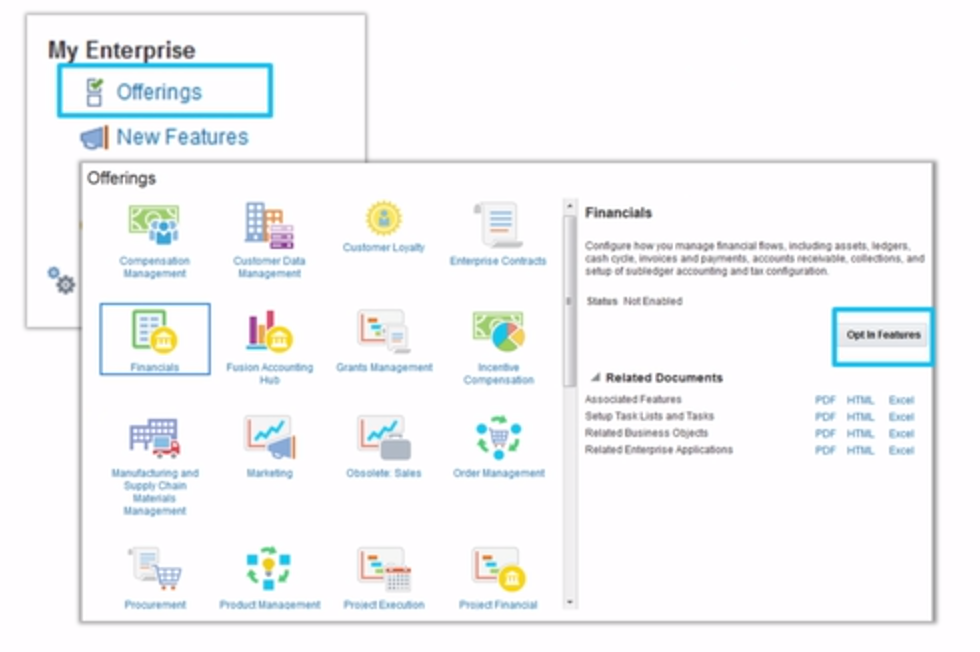
  1. Click on the Navigator and look for "My Enterprise" > Offerings
  2. Select the Offering you want to implement.
  3. Read the detailed description of the Offering to find out if this is what your organization requires
  4. Check the status to make sure that the offering is enabled
  5. Use the opt-in feature
  6. Use the related documents available in different formats (PDF, Excel, HTML) to learn more about implementation requirements, a list of implementation tasks, configurations that need to be completed, and new features.
There's also feature in the Opt-In that gives you the freedom to choose if you use the new features recently released by Oracle. For Example, the new features rolled out by the upgrade process is something your organization does not need, then you can simply not opt-in to that new feature.

Below is a Video Demonstration on Opting in to an Offering using the Functional Setup Manager in Oracle Fusion Applications:


For more full-detailed Tutorials and Tips, check out #TheOracleProdigy at https://lifeofanoracleprodigy.blogspot.com/
Follow The Oracle Prodigy on Facebook (https://www.facebook.com/theOracleProdigy/) and Twitter (https://twitter.com/D_OracleProdigy)

Configurations for Automatic Reconciliation Process for Cash Management in Oracle Fusion Applications

This article gives an overview of the configurations for Automatic Reconciliation Process for Cash Management in Oracle Fusion Applications. Below is a quick diagram:


Besides setting up the Bank, Bank Branch and Bank Accounts, below are some Configurations for Automatic Reconciliation Process for Cash Management in Oracle Fusion Applications:

Bank Statement Lines
Transaction Code
Transaction Type
Receipt 10,000 USD
222
Check
Disbursement 5,000 USD
475
Check
Bank Charges 100 USD
698
Fees

Bank Transaction Codes
  • Bank statement transaction codes are internal codes that are used on a bank statement line to identify the type of transaction being reported.
  • For example, there might be a code of "100" in the bank statement, and that code indicates that the line is a deposit.
  • These codes are normally numeric and these codes identify what the bank statement transaction line is about.
  • There are already predefined bank transaction codes, and custom codes can also be created.
  • In the example table above, it shows that transaction codes 222 and 475 are both Check transactions, but they are different because one is a Receipt from a Customer Payment (Inbound), and the other is a Payment Disbursement to a Vendor (Outbound). This is where Transaction type Mapping comes in.
  • Below is a video demonstration of Creating Bank Transaction Codes in Oracle Fusion Applications:

Transaction type Mapping
  • You want to make sure that those transaction codes mentioned above match to what your bank uses.
  • There are different transaction types for different modules, so Transaction type mapping identifies the transaction types for payables, receivables, and provide a description for them.
  • Some samples of transaction types are fees, lockbox, miscellaneous transactions, a reversal, a check, a bank adjustment. These are the transaction types that you will be mapping and specifying the module that they belong to.
Matching Rules
  • Allows the automatic reconciliation process to automatically match lines from a Statement to the transactions.
  • Usually, its one bank statement line to one system transaction (i.e. customer receipts in receivables, supplier payments in payables, etc) or one to many.
  • However, It does not have to be one to one. It can be one to many. One statement line that you are matching to a batch of customer receipts in AR. So a group of customer receipts, many to one, as you can see here. Many bank statement lines for one system transaction, or many to many, which makes the rules are a little more complex.
  • Below is a video demonstration of Creating Matching Rule in Oracle Fusion Applications:


Tolerance Rules
  • Tolerances specifies how much can you deviate in terms of amount, date or percentages.
  • For example, your specified tolerance is set to two to three days, it's going to allow the bank Statement to match if the date is a bit off by two to three days.
  • Another example would be If the amount is off by a few pennies, it might be due to the exchange rates that you see the difference, if you're dealing with multi-currency, and so on.
  • You can express variances or tolerances in an amount versus a percentage. If you use both, the system AutoReconciliation will consider the smallest of the two.
  • Below is a video demonstration of Creating Bank Statement Reconciliation Tolerance Rules in Oracle Fusion Applications:


Reconciliation Rule set
  • A group of rules that allow AutoReconciliation to match and assess tolerances and determine what is acceptable and what is not.
  • Groups together the matching rules, the tolerance rules, and attaches them to the bank account.
  • Below is a video demonstration of Creating Reconciliation Rule Sets in Oracle Fusion Applications:

  • Below is a video on how Reconciliation Rule Sets attaches to a bank account


Payment Code Map Groups
  • Payment Code Map Groups are codes that identify code groups in a bank statement such as opening and closing balances in a statement, and other codes that identify actual transactions lines on a bank statement. They simply identify if the line is an opening/closing balance or an actual transaction.
Payment Code Map Group Name
Field Value
Bank Transaction Code
Transaction Type Mapping
Bank of America BAI2
CE_TRX_CODE
174
WIRE IN
Citibank BAI2
CE_TRX_CODE
174
DEPOSIT

In the above example, Bank of America uses the code 174 to identify wires, but the same code, 174, might be used by Citibank to identify deposits. Of course, both of these are incoming money, but it is important to know the difference between a wire and a regular deposit.

For more full-detailed Tutorials and Tips, check out #TheOracleProdigy at https://lifeofanoracleprodigy.blogspot.com/
Follow The Oracle Prodigy on Facebook (https://www.facebook.com/theOracleProdigy/) and Twitter (https://twitter.com/D_OracleProdigy)

Overview of Managing Receivable System Options in Oracle Fusion Applications

The Receivable System Options controls a number of setup and configurations for the Receivables application. Some of these options are:
  1. Default Accounting
  2. Statement Delivery Email Configurations
  3. Transaction Delivery Email Configurations
  4. Customer Grouping Rules
  5. AutoInvoice Configurations
  6. Enabling of Late Charges (detailed article available: Overview of Processing Late Charges for Receivables in Oracle Fusion Applications)
Some of the options in the Receivable System Options are populated by the Rapid Implementation Spreadsheet.

Manage Receivable System Options can be accessed from the Functional Setup Manager using the following navigation:

  1. Go to Setup & Maintenance
  2. select "Financials" as the Setup
  3. choose Receivables as the Functional Area
  4. on the Receivables Tasks, select "Manage Receivable System Options"


The Manage Receivable System Options screen has two tabs: Billing & Revenue / Cash Processing


DSO - Days Sales Outstanding
-> Critical for Collections Module
-> shows how long it takes a customer to pay

AutoInvoice Log File Message Level -> Shows the level of detail the AutoInvoice Log shows (0 - 5??)

Bill Receivable
-> Like a Promissory note
-> not used in the US but used in Europe

For more full-detailed Tutorials and Tips, check out #TheOracleProdigy at https://lifeofanoracleprodigy.blogspot.com/
Follow The Oracle Prodigy on Facebook (https://www.facebook.com/theOracleProdigy/) and Twitter (https://twitter.com/D_OracleProdigy)

General Ledger Accounting Configurations in Oracle Fusion Applications

Every ledger must have the "4Cs":
- Chart of Accounts  (CoA) - helps organize the data
- must be associated with A Calendar - the Calendar identifies the time frame
- the Currency provides a financial measurement
- Convention - Accounting Convention - the statutory requirements of how we conduct our accounting.

Whether or not we're talking about a primary ledger or a secondary ledger, they must have these elements.


Recent Posts

SQL Fundamentals

Introduction to SQL and Syntax What is SQL? SQL stands for Structured Query Language. is a standard programming language for accessing datab...

Top Posts